EN TR
← PROJECTS
SYSTEMS
Sep 2024 – Jan 2025

ChatUp: A Spring Boot + React Native Chat Application

A two-tier chat application with a Java Spring Boot REST API, MongoDB, and an Expo/React Native client, featuring JWT authentication and friend-gated messaging.

JavaSpring BootMongoDBSpring SecurityJWTReact NativeExpoTypeScript

ChatUp is a client-server chat application built as the term project for an Advanced Java course in Fall 2024. It pairs a Java Spring Boot REST API, backed by MongoDB, with an Expo/React Native mobile client, and supports user accounts, friend relationships, one-on-one messaging, and group conversations. The bulk of the engineering sits in the backend, which is where the course’s focus, and most of the substantial work, lived.

Architecture
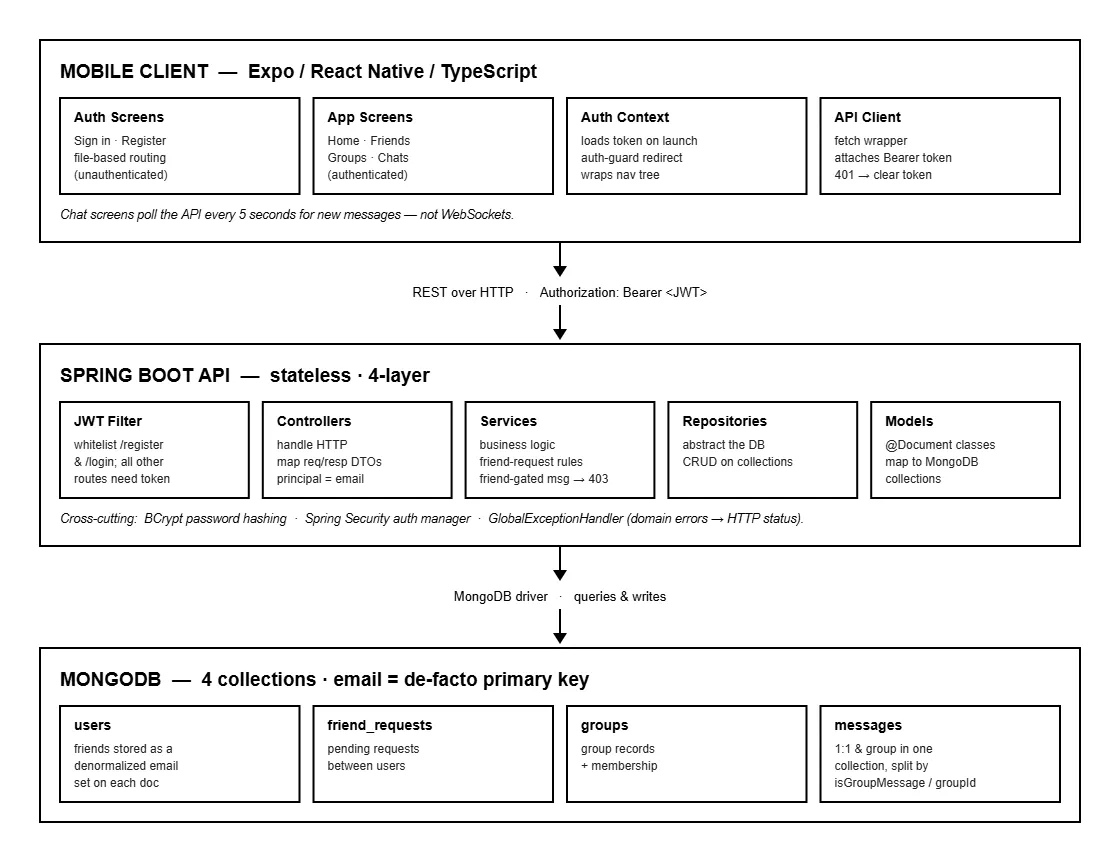
ChatUp architecture diagram showing the React Native client, Spring Boot API, and MongoDB collections
The two-tier system: an Expo/React Native client over REST, a stateless four-layer Spring Boot API, and four MongoDB collections

The system is two tiers: a stateless Spring Boot API and a mobile client that talks to it over REST. The backend follows a standard four-layer Spring structure, with controllers handling HTTP, services holding the business logic, repositories abstracting the database, and @Document model classes mapping to MongoDB collections. DTOs shape every request and response so the API’s surface is decoupled from the internal data model, and a single GlobalExceptionHandler centralizes the mapping from domain errors to HTTP status codes rather than scattering that logic across controllers.

Data lives in MongoDB across four collections: users, friend requests, groups, and messages. The data model makes some deliberate choices, friendships are stored as a denormalized set of emails directly on each user document rather than in a separate join collection, and a single messages collection serves both one-on-one and group messages, disambiguated by an isGroupMessage flag and a groupId field. Email is the de facto primary key throughout; there is no separate numeric user ID exposed to the client.

Authentication and security

The backend implements a complete JWT-based security stack. Registration hashes the password with BCrypt, stores the user, and immediately issues a JWT so that signing up doubles as logging in; login re-authenticates through Spring Security’s authentication manager and returns the same token-bearing response. Every other endpoint requires a bearer token, enforced by a custom JWT authentication filter, with only /register and /login whitelisted and all other routes requiring authentication.

Sessions are fully stateless, no server-side session state, the JWT is the only thing carried between requests, which is the appropriate model for a token-based API. The authenticated user is exposed to controllers as a principal whose username resolves to the user’s email, so business logic always has the current user’s identity without re-parsing the token.

Business logic

The service layer is where ChatUp goes beyond plain CRUD. Friend requests enforce real rules: a user cannot send a request to themselves, cannot re-request someone who is already a friend, and cannot duplicate a pending request. Accepting a request updates both users’ friend sets and persists both documents.

Messaging is friend-gated, the heart of the app’s access control. When a user tries to send a message, the service checks that the sender and recipient are mutual friends and rejects the attempt with a 403 if they are not, so the friendship graph directly governs who can talk to whom. Group messaging follows the same model, scoped to group membership. The full REST surface covers registration and login, friend listing and requests, group creation and membership, and message sending and retrieval for both conversation types.

The mobile client
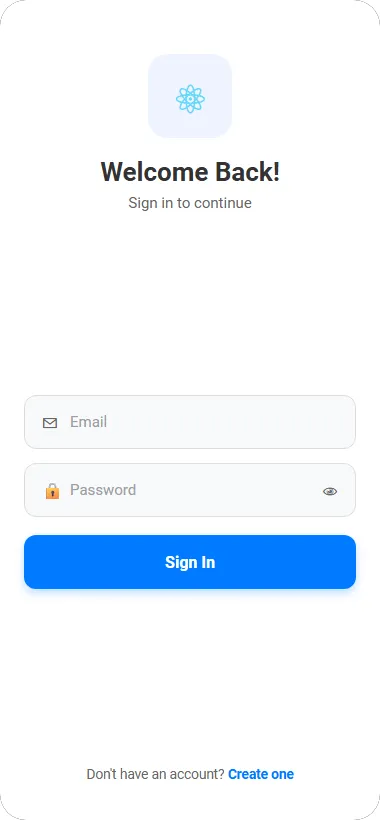
ChatUp sign-in screen with email and password fields
Sign in

The frontend is an Expo/React Native app written in TypeScript, using file-based routing to separate the unauthenticated auth screens from the authenticated app. Authentication state is managed through a React Context provider that loads the stored token on launch and redirects the user into or out of the app accordingly, a manual auth-guard pattern that wraps the whole navigation tree.
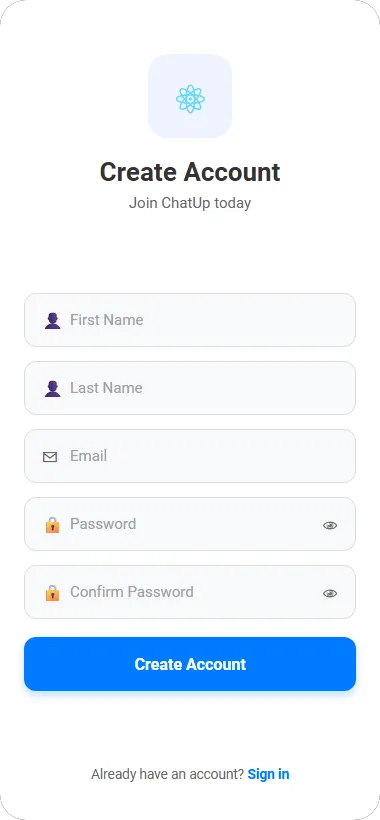
ChatUp create-account screen with name, email, and password fields
Account creation

All network calls go through a single hand-written API client class wrapping fetch. It attaches the bearer token from storage to every request automatically and handles 401 responses centrally by clearing the stored token, so authentication is enforced in one place rather than repeated at every call site. The backend base URL resolves per platform, using the Android emulator’s special host-loopback alias so the emulated app can reach the API running on the development machine.
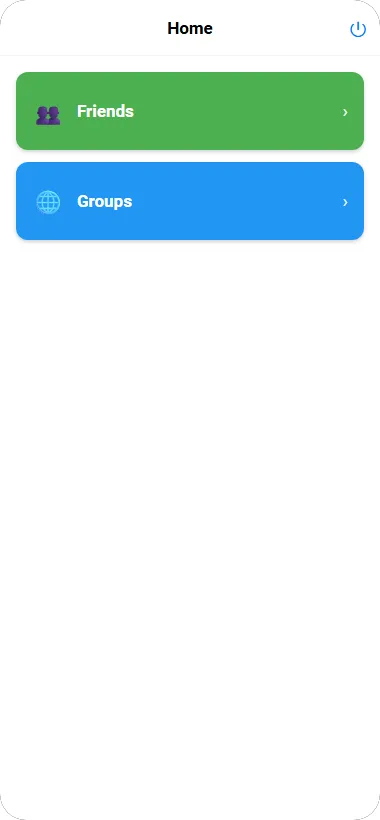
ChatUp home screen with Friends and Groups menu cards
The home menu

Navigation runs through a simple home menu rather than a tab bar, branching into the friends and groups sections.
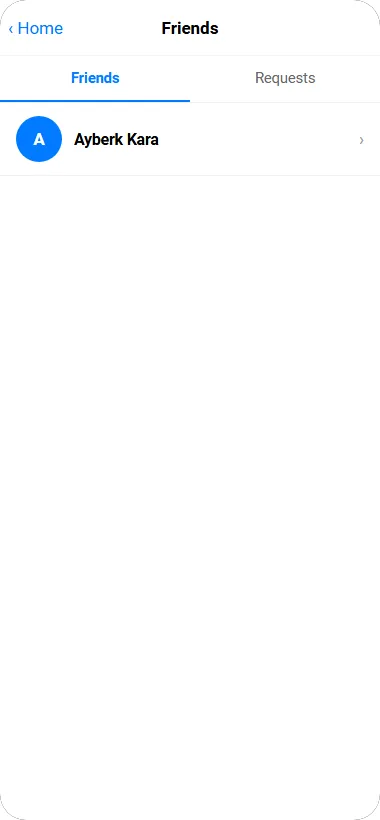
ChatUp friends list with a tabbed Friends and Requests view
The friends list, with a tab for incoming requests

The friends screen is a tabbed list separating current friends from incoming requests, with an inline search box for sending new requests by email.
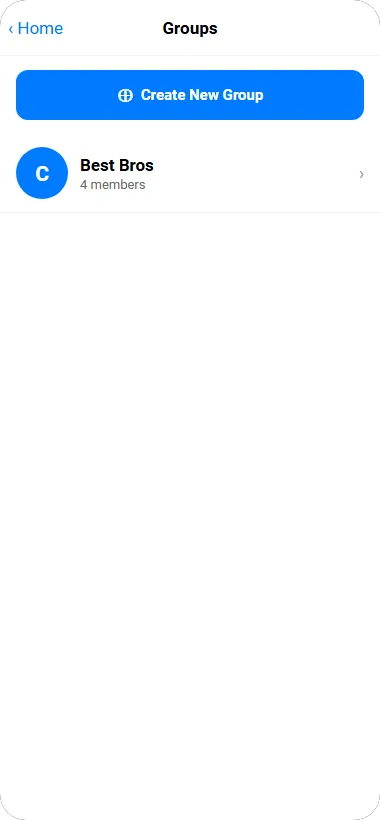
ChatUp groups list showing a group with a member count and a create-group button
Group list and creation

Groups are listed with member counts and can be created or joined from the same screen.
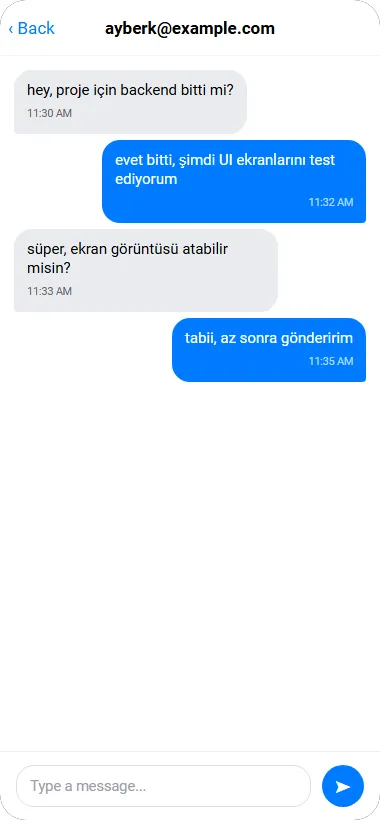
A one-on-one ChatUp conversation with blue sent bubbles and gray received bubbles
A one-on-one conversation

The chat screens use inverted lists so the newest message anchors at the bottom, with the familiar bubble styling, solid blue for sent, light gray for received, and the corner-pinched tail effect done through asymmetric border radii rather than tail graphics.
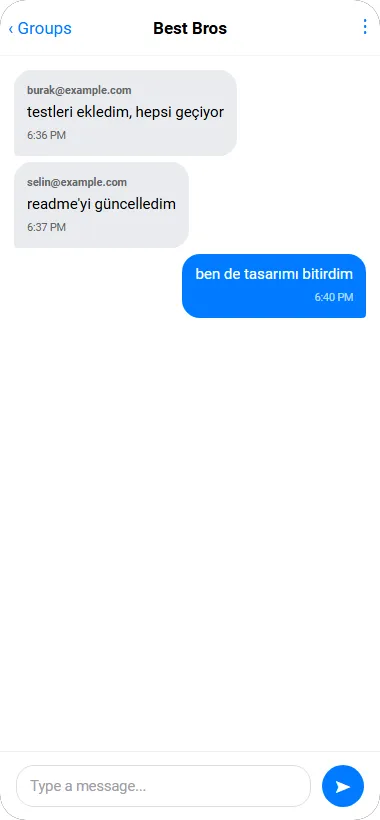
A ChatUp group conversation showing messages from multiple members
A group conversation

Throughout, the lists use real production patterns rather than placeholder rows: pull-to-refresh, loading spinners, and proper empty states with an icon and explanatory text.

On “real-time”

It is worth being precise about how live updates work, because it is a common point of overstatement. ChatUp does not use WebSockets, the chat screens poll the REST API every five seconds for new messages. This keeps the architecture simple and was adequate for the project, but it is not true real-time messaging, and a WebSocket or STOMP connection for push-based delivery would be the natural way to take it further.

Takeaways

ChatUp was, above all, about building a properly structured Java backend over the span of the course: layering a Spring application cleanly, implementing JWT authentication end to end, modeling data in MongoDB, and encoding real business rules like friend-gated messaging into a service layer rather than leaving the API as thin CRUD. Putting a React Native client on top, with its own token handling and platform-aware configuration, rounded it into a complete two-tier system. The most valuable part was working through how the pieces of a secured client-server application fit together across the full stack, from the database collections up to the screens, and making the architectural decisions that hold such a system together.

EN TR
← PROJECTS
SYSTEMS
Sep 2024 – Jan 2025

ChatUp: A Spring Boot + React Native Chat Application

A two-tier chat application with a Java Spring Boot REST API, MongoDB, and an Expo/React Native client, featuring JWT authentication and friend-gated messaging.

JavaSpring BootMongoDBSpring SecurityJWTReact NativeExpoTypeScript

ChatUp is a client-server chat application built as the term project for an Advanced Java course in Fall 2024. It pairs a Java Spring Boot REST API, backed by MongoDB, with an Expo/React Native mobile client, and supports user accounts, friend relationships, one-on-one messaging, and group conversations. The bulk of the engineering sits in the backend, which is where the course’s focus, and most of the substantial work, lived.

Architecture

ChatUp architecture diagram showing the React Native client, Spring Boot API, and MongoDB collections
The two-tier system: an Expo/React Native client over REST, a stateless four-layer Spring Boot API, and four MongoDB collections

The system is two tiers: a stateless Spring Boot API and a mobile client that talks to it over REST. The backend follows a standard four-layer Spring structure, with controllers handling HTTP, services holding the business logic, repositories abstracting the database, and @Document model classes mapping to MongoDB collections. DTOs shape every request and response so the API’s surface is decoupled from the internal data model, and a single GlobalExceptionHandler centralizes the mapping from domain errors to HTTP status codes rather than scattering that logic across controllers.

Data lives in MongoDB across four collections: users, friend requests, groups, and messages. The data model makes some deliberate choices, friendships are stored as a denormalized set of emails directly on each user document rather than in a separate join collection, and a single messages collection serves both one-on-one and group messages, disambiguated by an isGroupMessage flag and a groupId field. Email is the de facto primary key throughout; there is no separate numeric user ID exposed to the client.

Authentication and security

The backend implements a complete JWT-based security stack. Registration hashes the password with BCrypt, stores the user, and immediately issues a JWT so that signing up doubles as logging in; login re-authenticates through Spring Security’s authentication manager and returns the same token-bearing response. Every other endpoint requires a bearer token, enforced by a custom JWT authentication filter, with only /register and /login whitelisted and all other routes requiring authentication.

Sessions are fully stateless, no server-side session state, the JWT is the only thing carried between requests, which is the appropriate model for a token-based API. The authenticated user is exposed to controllers as a principal whose username resolves to the user’s email, so business logic always has the current user’s identity without re-parsing the token.

Business logic

The service layer is where ChatUp goes beyond plain CRUD. Friend requests enforce real rules: a user cannot send a request to themselves, cannot re-request someone who is already a friend, and cannot duplicate a pending request. Accepting a request updates both users’ friend sets and persists both documents.

Messaging is friend-gated, the heart of the app’s access control. When a user tries to send a message, the service checks that the sender and recipient are mutual friends and rejects the attempt with a 403 if they are not, so the friendship graph directly governs who can talk to whom. Group messaging follows the same model, scoped to group membership. The full REST surface covers registration and login, friend listing and requests, group creation and membership, and message sending and retrieval for both conversation types.

The mobile client

ChatUp sign-in screen with email and password fields
Sign in

The frontend is an Expo/React Native app written in TypeScript, using file-based routing to separate the unauthenticated auth screens from the authenticated app. Authentication state is managed through a React Context provider that loads the stored token on launch and redirects the user into or out of the app accordingly, a manual auth-guard pattern that wraps the whole navigation tree.

ChatUp create-account screen with name, email, and password fields
Account creation

All network calls go through a single hand-written API client class wrapping fetch. It attaches the bearer token from storage to every request automatically and handles 401 responses centrally by clearing the stored token, so authentication is enforced in one place rather than repeated at every call site. The backend base URL resolves per platform, using the Android emulator’s special host-loopback alias so the emulated app can reach the API running on the development machine.

ChatUp home screen with Friends and Groups menu cards
The home menu

Navigation runs through a simple home menu rather than a tab bar, branching into the friends and groups sections.

ChatUp friends list with a tabbed Friends and Requests view
The friends list, with a tab for incoming requests

The friends screen is a tabbed list separating current friends from incoming requests, with an inline search box for sending new requests by email.

ChatUp groups list showing a group with a member count and a create-group button
Group list and creation

Groups are listed with member counts and can be created or joined from the same screen.

A one-on-one ChatUp conversation with blue sent bubbles and gray received bubbles
A one-on-one conversation

The chat screens use inverted lists so the newest message anchors at the bottom, with the familiar bubble styling, solid blue for sent, light gray for received, and the corner-pinched tail effect done through asymmetric border radii rather than tail graphics.

A ChatUp group conversation showing messages from multiple members
A group conversation

Throughout, the lists use real production patterns rather than placeholder rows: pull-to-refresh, loading spinners, and proper empty states with an icon and explanatory text.

On “real-time”

It is worth being precise about how live updates work, because it is a common point of overstatement. ChatUp does not use WebSockets, the chat screens poll the REST API every five seconds for new messages. This keeps the architecture simple and was adequate for the project, but it is not true real-time messaging, and a WebSocket or STOMP connection for push-based delivery would be the natural way to take it further.

Takeaways

ChatUp was, above all, about building a properly structured Java backend over the span of the course: layering a Spring application cleanly, implementing JWT authentication end to end, modeling data in MongoDB, and encoding real business rules like friend-gated messaging into a service layer rather than leaving the API as thin CRUD. Putting a React Native client on top, with its own token handling and platform-aware configuration, rounded it into a complete two-tier system. The most valuable part was working through how the pieces of a secured client-server application fit together across the full stack, from the database collections up to the screens, and making the architectural decisions that hold such a system together.

ayberk@dev
EN TR
← PROJECTS
~/projects$ cat chatup.md
SYSTEMS
Sep 2024 – Jan 2025

ChatUp: A Spring Boot + React Native Chat Application

A two-tier chat application with a Java Spring Boot REST API, MongoDB, and an Expo/React Native client, featuring JWT authentication and friend-gated messaging.

#Java#Spring Boot#MongoDB#Spring Security#JWT#React Native#Expo#TypeScript

ChatUp is a client-server chat application built as the term project for an Advanced Java course in Fall 2024. It pairs a Java Spring Boot REST API, backed by MongoDB, with an Expo/React Native mobile client, and supports user accounts, friend relationships, one-on-one messaging, and group conversations. The bulk of the engineering sits in the backend, which is where the course’s focus, and most of the substantial work, lived.

Architecture

ChatUp architecture diagram showing the React Native client, Spring Boot API, and MongoDB collections
The two-tier system: an Expo/React Native client over REST, a stateless four-layer Spring Boot API, and four MongoDB collections

The system is two tiers: a stateless Spring Boot API and a mobile client that talks to it over REST. The backend follows a standard four-layer Spring structure, with controllers handling HTTP, services holding the business logic, repositories abstracting the database, and @Document model classes mapping to MongoDB collections. DTOs shape every request and response so the API’s surface is decoupled from the internal data model, and a single GlobalExceptionHandler centralizes the mapping from domain errors to HTTP status codes rather than scattering that logic across controllers.

Data lives in MongoDB across four collections: users, friend requests, groups, and messages. The data model makes some deliberate choices, friendships are stored as a denormalized set of emails directly on each user document rather than in a separate join collection, and a single messages collection serves both one-on-one and group messages, disambiguated by an isGroupMessage flag and a groupId field. Email is the de facto primary key throughout; there is no separate numeric user ID exposed to the client.

Authentication and security

The backend implements a complete JWT-based security stack. Registration hashes the password with BCrypt, stores the user, and immediately issues a JWT so that signing up doubles as logging in; login re-authenticates through Spring Security’s authentication manager and returns the same token-bearing response. Every other endpoint requires a bearer token, enforced by a custom JWT authentication filter, with only /register and /login whitelisted and all other routes requiring authentication.

Sessions are fully stateless, no server-side session state, the JWT is the only thing carried between requests, which is the appropriate model for a token-based API. The authenticated user is exposed to controllers as a principal whose username resolves to the user’s email, so business logic always has the current user’s identity without re-parsing the token.

Business logic

The service layer is where ChatUp goes beyond plain CRUD. Friend requests enforce real rules: a user cannot send a request to themselves, cannot re-request someone who is already a friend, and cannot duplicate a pending request. Accepting a request updates both users’ friend sets and persists both documents.

Messaging is friend-gated, the heart of the app’s access control. When a user tries to send a message, the service checks that the sender and recipient are mutual friends and rejects the attempt with a 403 if they are not, so the friendship graph directly governs who can talk to whom. Group messaging follows the same model, scoped to group membership. The full REST surface covers registration and login, friend listing and requests, group creation and membership, and message sending and retrieval for both conversation types.

The mobile client

ChatUp sign-in screen with email and password fields
Sign in

The frontend is an Expo/React Native app written in TypeScript, using file-based routing to separate the unauthenticated auth screens from the authenticated app. Authentication state is managed through a React Context provider that loads the stored token on launch and redirects the user into or out of the app accordingly, a manual auth-guard pattern that wraps the whole navigation tree.

ChatUp create-account screen with name, email, and password fields
Account creation

All network calls go through a single hand-written API client class wrapping fetch. It attaches the bearer token from storage to every request automatically and handles 401 responses centrally by clearing the stored token, so authentication is enforced in one place rather than repeated at every call site. The backend base URL resolves per platform, using the Android emulator’s special host-loopback alias so the emulated app can reach the API running on the development machine.

ChatUp home screen with Friends and Groups menu cards
The home menu

Navigation runs through a simple home menu rather than a tab bar, branching into the friends and groups sections.

ChatUp friends list with a tabbed Friends and Requests view
The friends list, with a tab for incoming requests

The friends screen is a tabbed list separating current friends from incoming requests, with an inline search box for sending new requests by email.

ChatUp groups list showing a group with a member count and a create-group button
Group list and creation

Groups are listed with member counts and can be created or joined from the same screen.

A one-on-one ChatUp conversation with blue sent bubbles and gray received bubbles
A one-on-one conversation

The chat screens use inverted lists so the newest message anchors at the bottom, with the familiar bubble styling, solid blue for sent, light gray for received, and the corner-pinched tail effect done through asymmetric border radii rather than tail graphics.

A ChatUp group conversation showing messages from multiple members
A group conversation

Throughout, the lists use real production patterns rather than placeholder rows: pull-to-refresh, loading spinners, and proper empty states with an icon and explanatory text.

On “real-time”

It is worth being precise about how live updates work, because it is a common point of overstatement. ChatUp does not use WebSockets, the chat screens poll the REST API every five seconds for new messages. This keeps the architecture simple and was adequate for the project, but it is not true real-time messaging, and a WebSocket or STOMP connection for push-based delivery would be the natural way to take it further.

Takeaways

ChatUp was, above all, about building a properly structured Java backend over the span of the course: layering a Spring application cleanly, implementing JWT authentication end to end, modeling data in MongoDB, and encoding real business rules like friend-gated messaging into a service layer rather than leaving the API as thin CRUD. Putting a React Native client on top, with its own token handling and platform-aware configuration, rounded it into a complete two-tier system. The most valuable part was working through how the pieces of a secured client-server application fit together across the full stack, from the database collections up to the screens, and making the architectural decisions that hold such a system together.