GhostDJ: A Music Player You Control by Waving Your Hand
A webcam-based music player with no buttons and no gesture classifier, the entire interface is built from tracking two fingertips and a dwell timer, using hand-landmark detection and spatial hit-testing.
GhostDJ is a music player with no buttons, no mouse, and no touchscreen. You control it by moving your hand in front of a webcam: a fingertip becomes the cursor, holding it over a control activates that control, and pinching two fingers together scrolls the song list. It was built for a Human-Computer Interaction course (February to June 2025). The interesting part is not that it tracks a hand, plenty of things do that, but how little machinery the whole interaction is built from.
How it works
A pretrained hand-landmark model returns 21 points for the detected hand each frame, and GhostDJ uses just two of them. Everything the interface does, pointing, selecting, adjusting volume, scrolling, is built by asking simple spatial questions about where those two fingertips are and how far apart they are. That is a deliberate design choice with a real tradeoff: it keeps the app fast and removes the need to train or ship any gesture model, at the cost of requiring a “hold still to act” interaction rather than snappy discrete clicks. The constraint shapes the whole feel of the thing, and most of the design work went into making that constraint feel natural.
Turning a fingertip into a cursor
The hand model reports landmark positions normalized to the frame, so each frame the index fingertip is scaled back to actual pixel coordinates and used as a cursor. The webcam image is mirror-flipped first, so moving your hand right moves the cursor right, matching the intuition of looking at yourself in a mirror rather than the camera’s true orientation.
The cursor is drawn as a small icon composited onto the live video. Because the icon is a transparent PNG and the webcam frame is not, a naive paste would leave an ugly opaque box around it, so the overlay is alpha-blended per pixel: transparent parts of the icon leave the video untouched, opaque parts replace it, and the edges blend smoothly. There is bounds-clamping so the cursor can be drawn partly off-screen near the edges without crashing the program.
Three kinds of control, three kinds of hit-testing
That single cursor point drives three different interface surfaces, each tested differently.
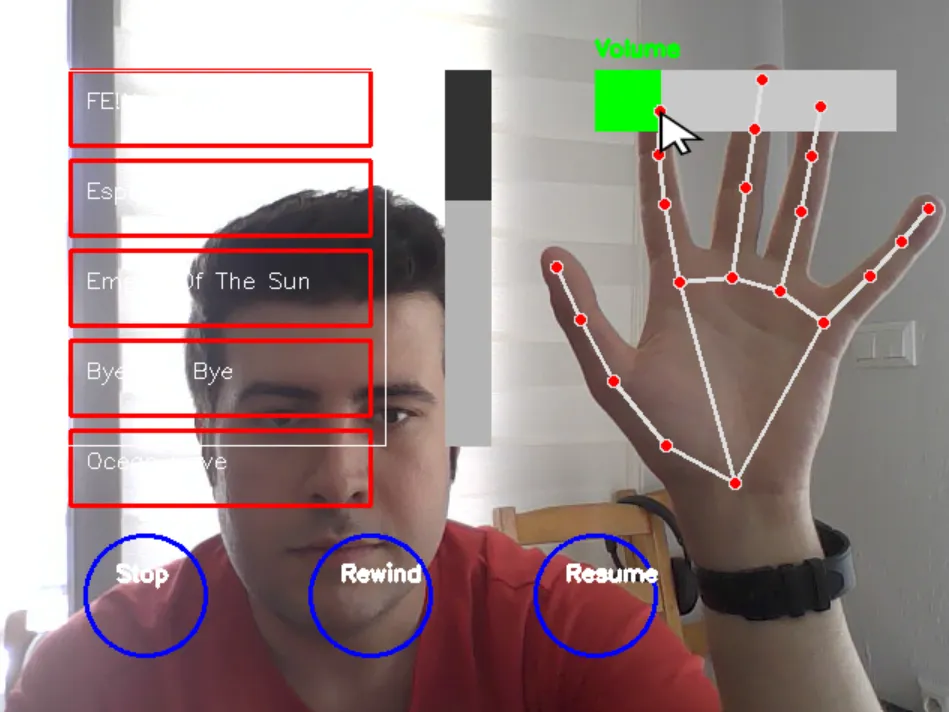
The circular controls (Stop, Rewind, Resume) are hit-tested by distance: the cursor is “over” a control when it falls within a fixed radius of that control’s center. The volume slider is the one directly manipulated control in the app, the moment the cursor enters the slider’s bar, volume is set continuously from its horizontal position, so sliding your finger left and right scrubs the volume live with no dwell or confirmation. The song list is a clipped, scrollable viewport: twelve songs are laid out as stacked boxes, but only those falling inside the visible window are drawn and made hit-testable, with a proportional scrollbar thumb showing position.
Selecting without clicking
The central problem of a flat webcam interface is that there is no clean way to detect a click. There is no button to press and no depth signal to read a “tap” from. GhostDJ solves this with dwell time, the same approach used in eye-tracking systems and accessibility switches: to activate a control, you hold the cursor over it.
While the cursor rests on a target, a counter climbs, and a white arc grows clockwise around the target like a radial progress ring, filling as you hold. When it completes, roughly under a second of holding still, the action fires once and the counter resets, so it will not retrigger while you keep hovering. Move to a different target and the progress resets immediately; no partial progress carries over. That growing ring is the whole feedback story: it tells you something is about to happen and gives you the moment to pull away if you did not mean it.
Pinch to scroll
The song list needs scrolling, and scrolling needs a continuous gesture distinct from pointing. GhostDJ uses a pinch: bring the index and middle fingertips together, measured as the distance between those two points, and while that pinch is held inside the scrollbar region, vertical movement of the fingertip scrolls the list.
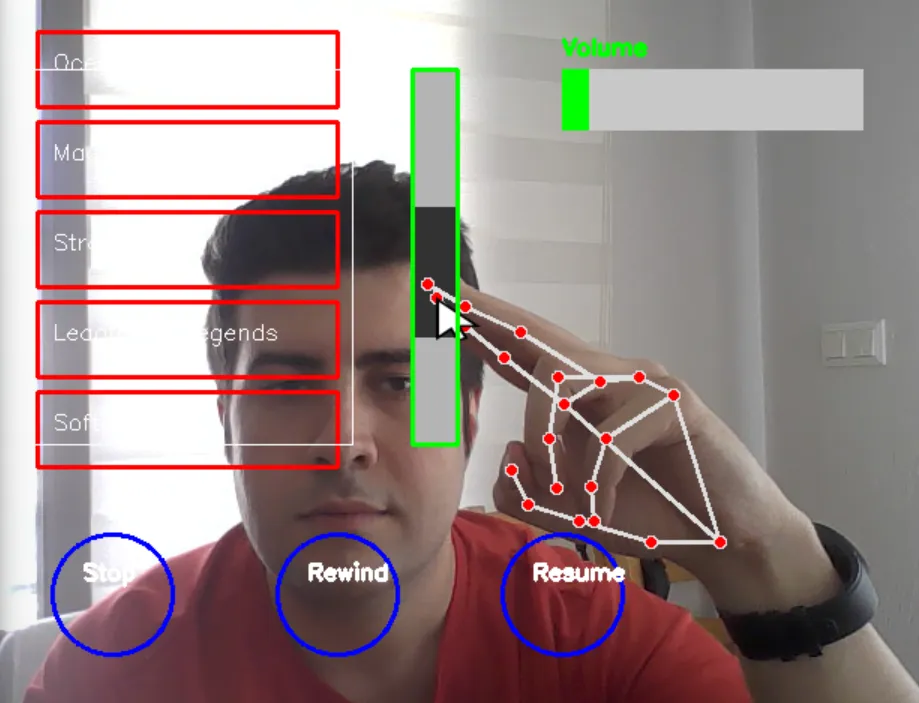
It is a relative-delta drag, not absolute positioning: each frame adds however far the fingertip moved since the last one, clamped so the list cannot scroll past either end. Releasing the pinch or leaving the scrollbar region stops it. That two-point distance is the second fingertip earning its place, pointing needs one point, but a pinch needs two.
What it adds up to
Structurally GhostDJ is deliberately plain: a single loop that reads a webcam frame, runs hand detection, draws the interface, and responds, about thirty times a second, with no class hierarchy or event system. All the design lives in the interaction model rather than the architecture. The takeaway is that a complete, usable gestural interface, a cursor, three control types, live volume, dwell-to-select, and pinch-to-scroll, can be built entirely from two fingertip coordinates and a timer, without a single trained gesture. The cleverness is in the geometry and the feedback, not in the model.